The best presentation clicker is the phone in your pocket
The quickest way to have a clicker is the phone already in your pocket. A physical clicker is one remote, in the room, within range of its receiver. A NextSlide link turns any phone into a clicker that works from anywhere and shows your speaker notes - nothing new to buy, charge, pair, or lose.
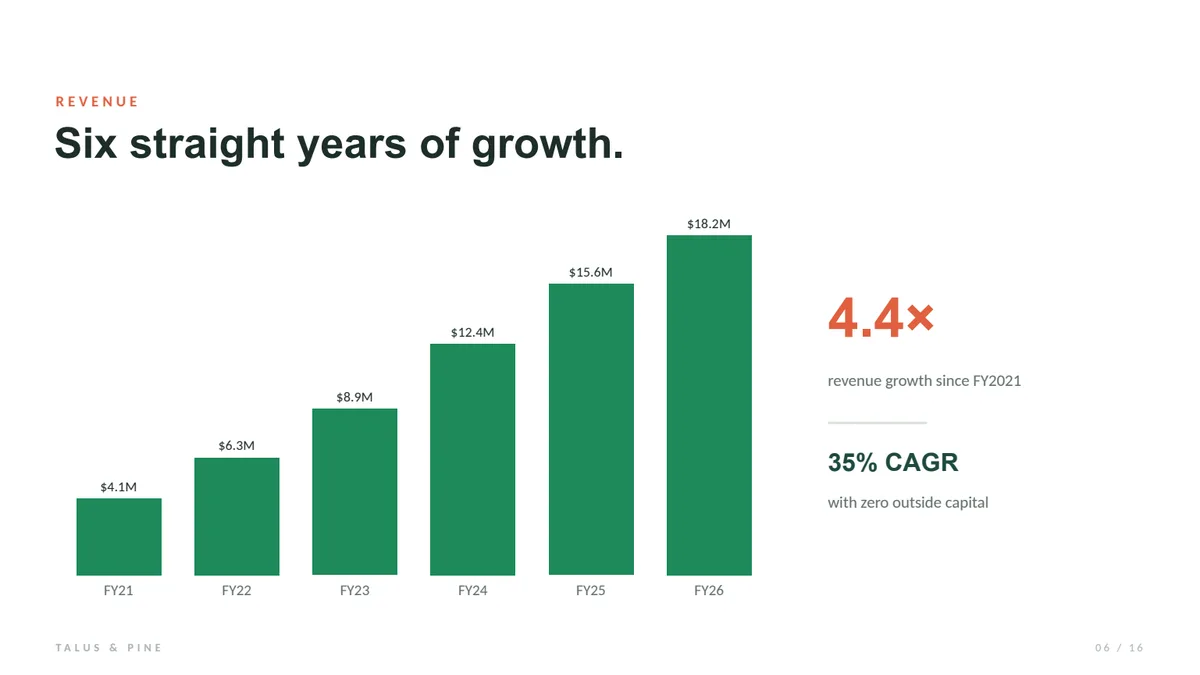
$4.1M to $18.2M in six years - a 35% compound rate, no outside capital.

What a traditional clicker can't do
A physical RF or Bluetooth clicker is simple and reliable - but it only works in the room, within range of the receiver, one remote per presenter. It can't show your notes, it can't be handed to a co-presenter across the country, and it's one more thing to charge, pack, and not lose. For a solo talk next to your own laptop, that's fine. For anything bigger, it's a ceiling.

RF clicker
In the room, within receiver range
Phone + NextSlide
Any presenter, anywhere with internet
Physical, Bluetooth, or internet: which clicker fits?
"Presentation clicker" now covers three very different things. Here's how they compare.
| Physical RF clicker | Bluetooth app (e.g. PPTControl) | Host-relay app (e.g. Cliqer, Internet Clicker) | NextSlide | |
|---|---|---|---|---|
| How it connects | USB receiver / RF | Bluetooth to your computer | Internet → software on a host computer | Internet → presentation hosted in the cloud |
| Range | In-room, line of sight | Same network or room | Anywhere with internet | Anywhere with internet |
| Multiple presenters | One remote per presenter | Not listed | Yes | Yes - unlimited |
| Needs the presentation running on a host computer | Yes | Yes | Yes | No - hostless |
| Install required | USB receiver | Desktop + mobile app | Desktop client on the host | None - browser only |
| Speaker notes on the remote | No | Sometimes | Yes | Yes |
| Audience & confidence views | No | Not listed | Presenter view + timer | Yes |
| Pricing model | One-time hardware purchase | Free; Pro from $4.99 | Subscription or per-host license | One-time $15 event, or $129/yr |
Cliqer and Internet Clicker drive your live presentation software, so animations and video play natively - a real advantage for animation-heavy presentations. NextSlide converts presentations to images for its hostless, no-install workflow, so it trades live-app effects for "nothing to install and nothing to keep running."
When a basic clicker is all you need
If you only ever present solo, standing beside your own laptop, with no internet to rely on, a simple RF clicker is hard to beat - it's instant and offline. NextSlide is built for the other times: remote or multiple presenters, large or hybrid venues, and not wanting one more gadget to charge and carry.
Why your phone is the better clicker
Works from anywhere
The advance signal travels over the internet, so you (or a co-presenter three time zones away) can drive the presentation from any room.
Nothing to install or forget
Open a link in the browser. No dongle, no app on the host machine, no dead batteries mid-talk.
Your notes come with you
See the current slide, what's next, and your speaker notes right on the phone.
Hand it to the whole team
Share one link and every presenter drives their own part, in sync - no "next slide, please."
Want the full walkthrough? See how to use your phone as a presentation clicker.
Compare NextSlide to specific clickers
Compare more: vs a physical clicker, vs PPTControl, vs Cliqer, vs Internet Clicker, vs OctoCue, vs SlidesClicker. Or see it all on the NextSlide homepage.
Presentation clicker FAQ
What is the best presentation clicker?
For most presenters, the best clicker is their own phone. A NextSlide link turns any phone into a clicker that works from anywhere, shows your speaker notes, and lets several presenters share control from wherever they are. A physical remote is one device, in one room, within range of its receiver - still fine if you only ever present in the room, next to your laptop.
Are phone apps better than physical presentation clickers?
For remote or multi-presenter events, yes - a phone works from anywhere and needs no dongle or batteries. For solo, in-room, offline presenting, a simple RF clicker is hard to beat for sheer simplicity.
Do I need to install anything to use my phone as a clicker?
With NextSlide, no - it runs in the browser. Bluetooth apps like PPTControl, and host-relay tools like Cliqer or Internet Clicker, need a desktop app - or, for Internet Clicker, a presentation plugin - running on the computer running your presentation.
Can multiple presenters share one clicker?
A physical clicker is one remote per presenter, all in the room within range of the receiver, and a phone app like PPTControl connects one phone to one computer - neither lists a shared-control mode. Internet clickers like NextSlide let everyone with the link share control and advance the presentation in turn.
What is an internet clicker?
An internet clicker advances your slides over the internet instead of over Bluetooth or RF, so presenters can drive the presentation from anywhere. NextSlide goes a step further by hosting the presentation itself, so there's no presentation software to install or keep running on a host computer.
Try the clicker you already own
Upload a presentation and drive it from your phone in minutes - free.
