NextSlide vs PPTControl
PPTControl turns your phone or Apple Watch into a Bluetooth remote for a presentation running on a computer in the same room. NextSlide takes a different approach: it hosts your presentation in the cloud, so anyone with a link can advance the slides from any device, anywhere - with nothing to install. If you present solo and in-room, PPTControl is a great free remote; if you present remotely or with a team, NextSlide is built for that.
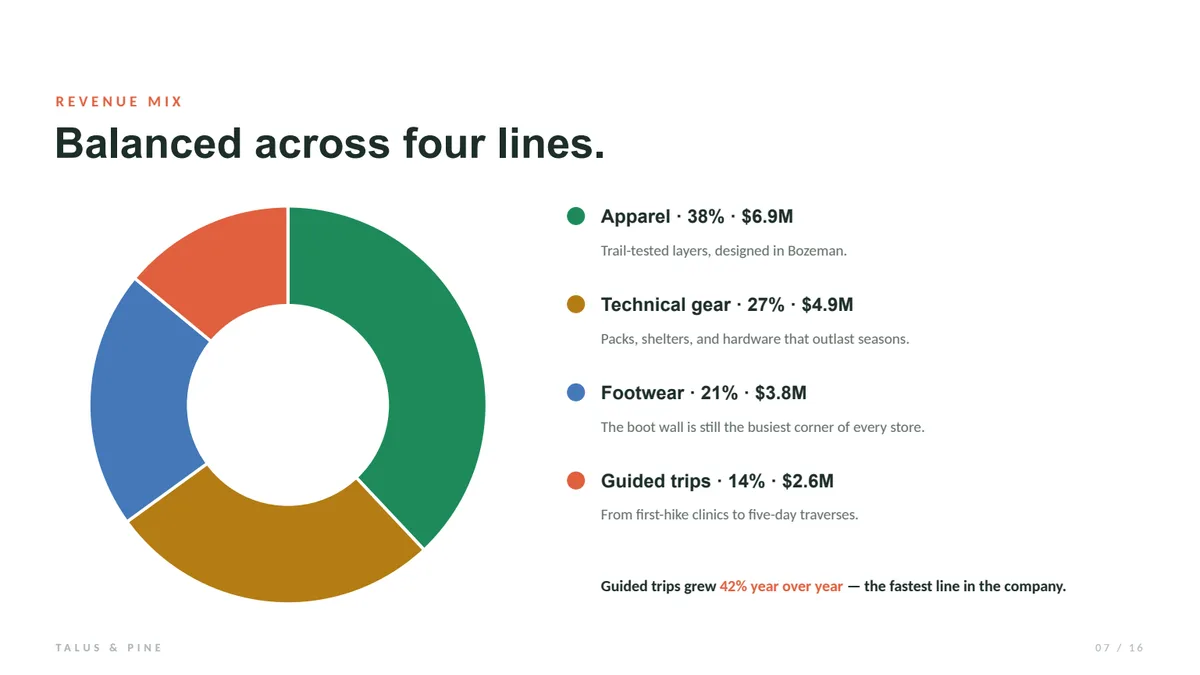
The mix is healthy - no line above forty percent. Watch guided trips: up 42%.

The short version
Choose PPTControl if you present in-room and want a free, offline remote over Wi-Fi or Bluetooth - with an Apple Watch app and, via its paid Pro unlock, speaker notes for PowerPoint and Keynote.
Choose NextSlide if you present remotely or with a team - it hosts the presentation in the cloud so anyone drives it from a browser, with nothing to install.
What PPTControl is
PPTControl is a polished, free remote from an independent developer. You install its desktop app on your Mac or Windows computer, open your PowerPoint, Keynote, or Google Slides, and connect your phone, tablet, or Apple Watch over Wi-Fi or Bluetooth. Its paid Pro unlock adds speaker notes for PowerPoint and Keynote, slide previews, and a laser-style pointer with cursor control. It works completely offline.
The core difference
PPTControl is a clicker replacement - one phone connected to one computer, with the presentation running on that host computer. NextSlide is hostless: your presentation lives in the browser, multiple presenters share a link, and there's no software on the presenting machine.
| PPTControl | NextSlide | |
|---|---|---|
| How it connects | Wi-Fi or Bluetooth, same network or room | Internet, anywhere |
| Presenters | One phone per computer; no shared control listed | Unlimited, shared by link |
| Needs the presentation running on a host computer | Yes, plus its desktop app | No - hostless, presentation in the cloud |
| Install required | Desktop + mobile app | None - browser only |
| Remote / hybrid presenters | No | Yes |
| Audience & confidence views | No | Yes |
| Works offline | Yes | No - needs internet |
| Pricing | Free; Pro from $4.99 (in-app) | One-time $15 event, or $129/yr |
When PPTControl is the better choice
If you mostly present solo, standing beside your own laptop, PPTControl is hard to beat - it's free, it pairs in seconds, it has an Apple Watch app, and it keeps working with no internet at all. NextSlide can't do offline; it trades that for working from anywhere, for everyone.
Why presenters choose NextSlide
When a talk involves remote presenters, a panel sharing control, big-venue audience screens, or you simply don't want an app on the presenting computer, NextSlide's hostless model removes the in-room ceiling of a connected remote, lets any number of presenters share control, and adds audience and confidence views that PPTControl's feature list does not include.


Compare more: Best presentation clicker, vs a physical clicker, vs Cliqer, vs Internet Clicker, vs OctoCue, vs SlidesClicker. Or see it all on the NextSlide homepage.
NextSlide vs PPTControl FAQ
What's the difference between NextSlide and PPTControl?
PPTControl is a Bluetooth remote: it pairs your phone or Apple Watch to a computer in the same room and needs its desktop app running alongside your presentation. NextSlide is hostless and internet-based - you upload your presentation, share a link, and anyone can drive it from anywhere, with nothing to install.
Is NextSlide a good PPTControl alternative?
If you present solo, in the room, and want a free offline remote, PPTControl is excellent. If you need remote or multiple presenters, audience and confidence views, or no software on the presenting computer, NextSlide is the better fit.
Does NextSlide work over Bluetooth like PPTControl?
No - NextSlide works over the internet, so there's no range limit and no pairing. The tradeoff is that NextSlide needs a connection, while PPTControl can run fully offline.
Present from anywhere, not just the front row
Upload a presentation and share your first link in minutes - free.
