NextSlide vs a physical clicker
For most presenters, the best clicker is the phone already in your pocket. A physical RF clicker is one remote, in the room, within range of its receiver. A NextSlide link turns any phone into a clicker that works from anywhere, shows your speaker notes, and lets your whole team share control - nothing to buy, charge, pair, or lose.
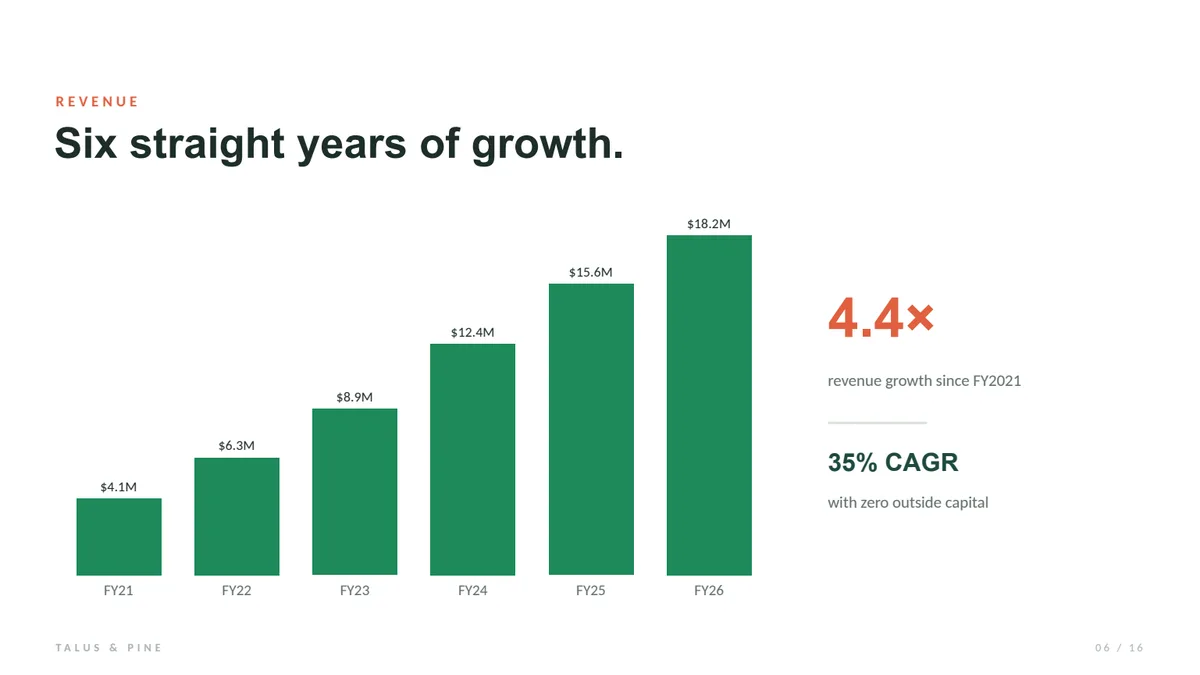
$4.1M to $18.2M in six years - a 35% compound rate, no outside capital.


The short version
Choose a physical clicker if you only present solo, in the room, within range of your laptop, and want something offline and instant.
Choose NextSlide if you want the phone you already own to be the clicker - working from anywhere, showing your notes, and ready to hand to a whole team.
What a physical clicker is - and when it still wins
A physical presentation clicker is a small handheld remote - RF with a USB receiver, or Bluetooth - that advances your slides while you stand near the presenting computer. It's offline and instant, with next and back buttons and sometimes a laser pointer, and it drives whatever software is open on that machine.
And sometimes that's exactly right: if you only ever present solo, in the room, standing next to your laptop, a simple RF clicker is hard to beat. It's offline and instant, and there's nothing to log into - just make sure the presenter laptop has a free USB slot and the batteries are fresh.
The core difference
A physical clicker is a simple in-room remote - within range of a receiver plugged into the laptop running your slides. NextSlide turns the phone you already own into a clicker that works over the internet, so anyone can drive from anywhere and see their notes, with nothing to install.
Physical clicker
Bluetooth / RF - one receiver, one room
NextSlide on your phone
Internet - every presenter, anywhere
| Physical clicker | NextSlide on your phone | |
|---|---|---|
| Range | Bluetooth / RF, one room | Anywhere with internet |
| Presenters | One per remote, all in the room | Unlimited, shared control |
| Speaker notes | No | Yes, on your phone |
| Setup | USB dongle / pairing | Open a link |
| To buy | A remote to buy | Free to start |
| Forget or lose it | Easy to | It's your phone |
| Batteries | Yes | No |
| Works offline | Yes | Needs internet |
Why presenters choose NextSlide
For everyone else, the phone you already own is the better clicker: it works from anywhere with internet, not just across the room; your speaker notes and next slide sit right on screen; you can hand the link to every presenter so they all drive in sync; and there's nothing to buy, charge, pair, or leave in a drawer. No hardware to connect, no batteries to die mid-talk - and it's just as at home in a remote or hybrid event as in the room.
Compare more: Best presentation clicker, vs PPTControl, vs Cliqer, vs Internet Clicker, vs OctoCue, vs SlidesClicker. Or see it all on the NextSlide homepage.
NextSlide vs a physical clicker FAQ
Is my phone as good as a presentation clicker?
For most presenters, better. It does everything an RF clicker does - forward, back, slide number - plus speaker notes, multi-presenter control, and it works from anywhere with internet. An RF clicker only wins when you're solo, in-room, and offline.
Do I need to buy a clicker at all?
No. Open your NextSlide presenter link on your phone and tap the arrows. There's nothing to buy, and nothing to install.
What if there's no wifi at the venue?
Your presentation is pre-loaded, so only a tiny advance signal crosses the network; it works on weak connections. If there's truly no internet at all, a physical RF clicker is the better fall-back.
Can more than one person use it?
Yes. Share the presenter link and everyone drives the slides from their own phone, from anywhere, in sync - no extra remote per presenter and no receiver to stay within range of.
Try it before you buy a clicker
Tap through the demo on your phone, or start free and share your own presentation.
